Guide | MobiPOS > Kiosk Terminal > Settings/Setup > Kiosk Takeaway
Takeaway
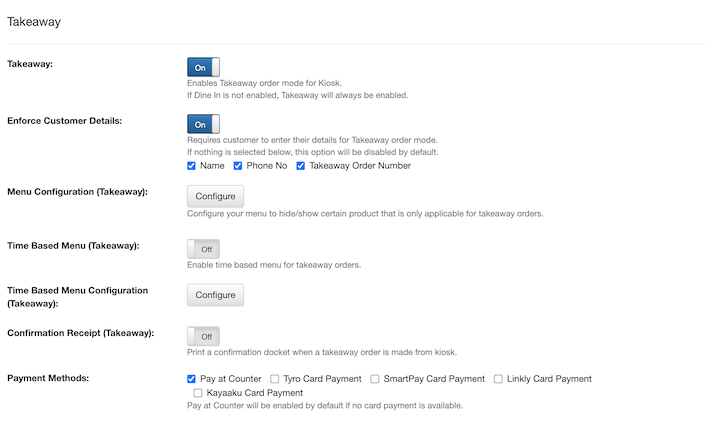
When enabled, customers can place Takeaway orders through the kiosk.
If Dine In is disabled, takeaway will be automatically enabled as the only available order mode.
Enforce Customer Details
When enabled, customers will be required to enter their details.
You can optionally tick or untick the checkbox to enable or disable this requirement.
If no options are selected to be required, toggle will be turned off by default.
Menu Configuration
Customize your menu to show or hide specific items that are available only for takeaway orders placed through the kiosk.
Time Based Menu Configuration
Customize your menu here to show or hide specific items that are only available at specific times of the day for kiosk orders.
Confirmation Receipt
When enabled, a confirmation docket will be printed automatically whenever a takeaway order is placed from the kiosk.
Payment Methods
Select the payment methods available for kiosk orders here.
If no card payment method is selected, Pay at Counter will be enabled by default.
Customers can choose from various payment options, including Tyro, SmartPay, Linkly, and Kayaaku card payments.