Guide | MobiPOS > General > Switching Device due to Lost Main POS
Switching Device due to Lost Main POS
There’s 2 ways to recover.
If you are subscribed to CloudSync, you can restore data from the cloud. However if you are not, then you will need to change a terminal to be a main POS.
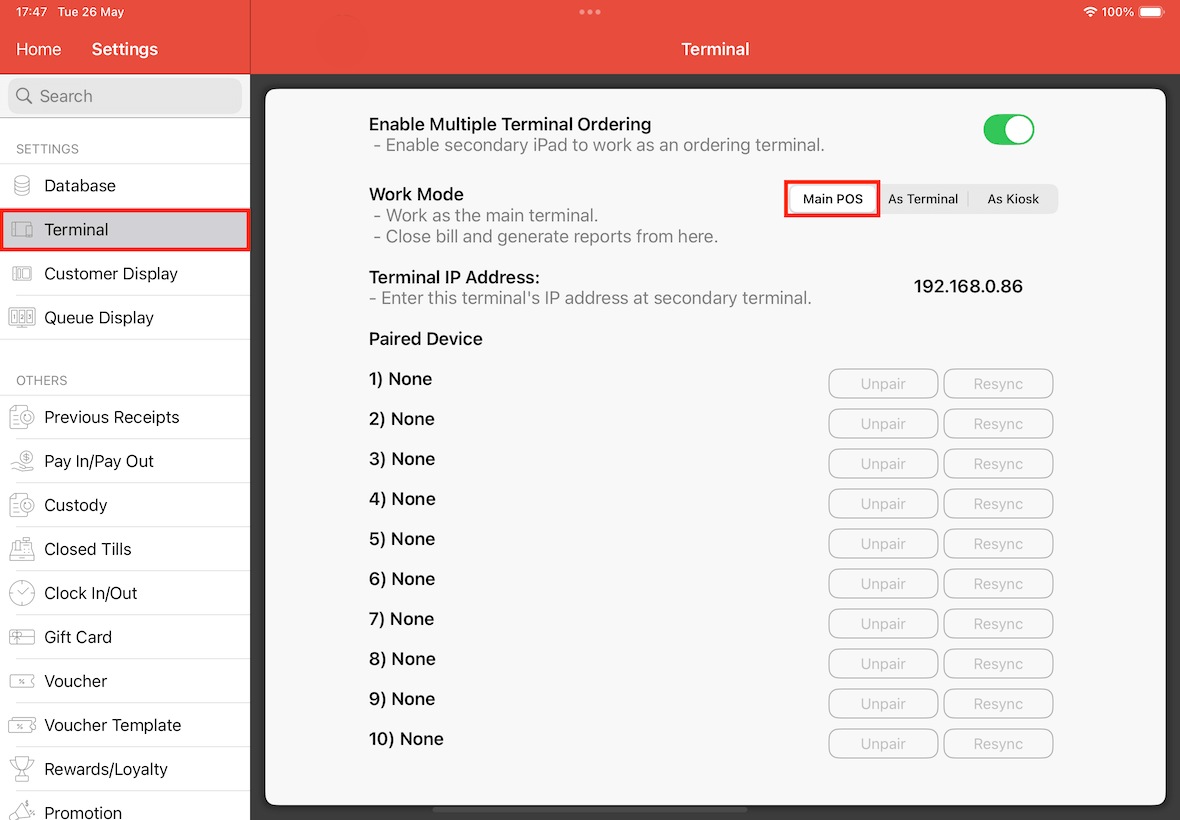
Be it a new device or an existing terminal, make sure that it is configured as a main pos.
Go to Settings -> Terminal, ensure that it is set as a main pos.
License Activation
Once that is done, you will need to login the license.
Please refer to this guide on how to login the license.
If you are not subscribed to CloudSync, that’s the only 2 steps that you need to do.
You can now use this device as the main POS.
However, by doing so, you would lose some data in between your last sync with the original main POS.
*All transaction information is stored on the main pos, terminal will only replicate that after each full sync.
Consider this scenario:
At 12pm, the terminal syncs with the main POS. Both device now contains identical sales data of up to 12pm.
If the main pos is stolen later at 1pm, changing the terminal to be a main pos right now would mean that the data rolls back to 12pm, any sales or modification done between 12pm to 1pm will be lost. *
Restore from Cloud
If you are subscribed to CloudSync, please refer to this guide on how to restore the data from cloud.